How to see who viewed a document you shared.
A named visit, active seconds per page, and a clear limit on what those numbers mean.
Share the document with verified email, then open that document’s Overview after the recipient uses the link. You see the email, whether it was verified, when the visit started, active time, and completion. Open the session for active seconds on each page. The figures are activity. They do not prove someone read, understood, or agreed.
Try this with your own documentThe link setting decides the name.
AnyShare can only show an identity the link asked for. Set it before you send.
- Verified email is the default. The recipient confirms the inbox with a one-time code. The visit is labeled Verified email.
- Email capture asks for an address and does not confirm it. The visit is labeled Email not verified.
- Anonymous lets anyone with the link view. The visit is labeled Anonymous viewer. There is no name to show.
- An allowlist limits which addresses can continue, and it requires verification.
A verified email confirms access to that inbox. It is not proof of legal identity, and one inbox can be shared. Add a password when the URL itself should have a second check. The password guide explains that the password gates the link and does not encrypt the file.
Creating the link is not a view.
The Overview stays empty until someone opens the share link and passes the checks. Copying the URL, sending the email, or asking an assistant for analytics does not add a session. Reading a report never creates a document view.
Use Preview to check the file yourself. When you want to confirm that a recipient visit is recorded, open the actual share link as the recipient would, in a private window, and complete the same checks. Then refresh the Overview and confirm the version selector. Earlier visits stay tied to the version that was open then.
Four numbers. Then the people.
Open the document and stay on Overview. Select the version. The summary is for that version:
- Total views counts document viewing sessions, not distinct people. A return visit is another view.
- Unique viewers groups sessions that share an email address. Each anonymous session counts separately.
- Average time is active time per view in the selected results.
- Completion rate averages each session’s completion. A session’s completion is the percentage of that version’s pages with recorded active time.
Under “The people behind the views,” each row shows the viewer, when the visit started, active time, and completion. The label under the email says Verified email, Email not verified, or Anonymous session.
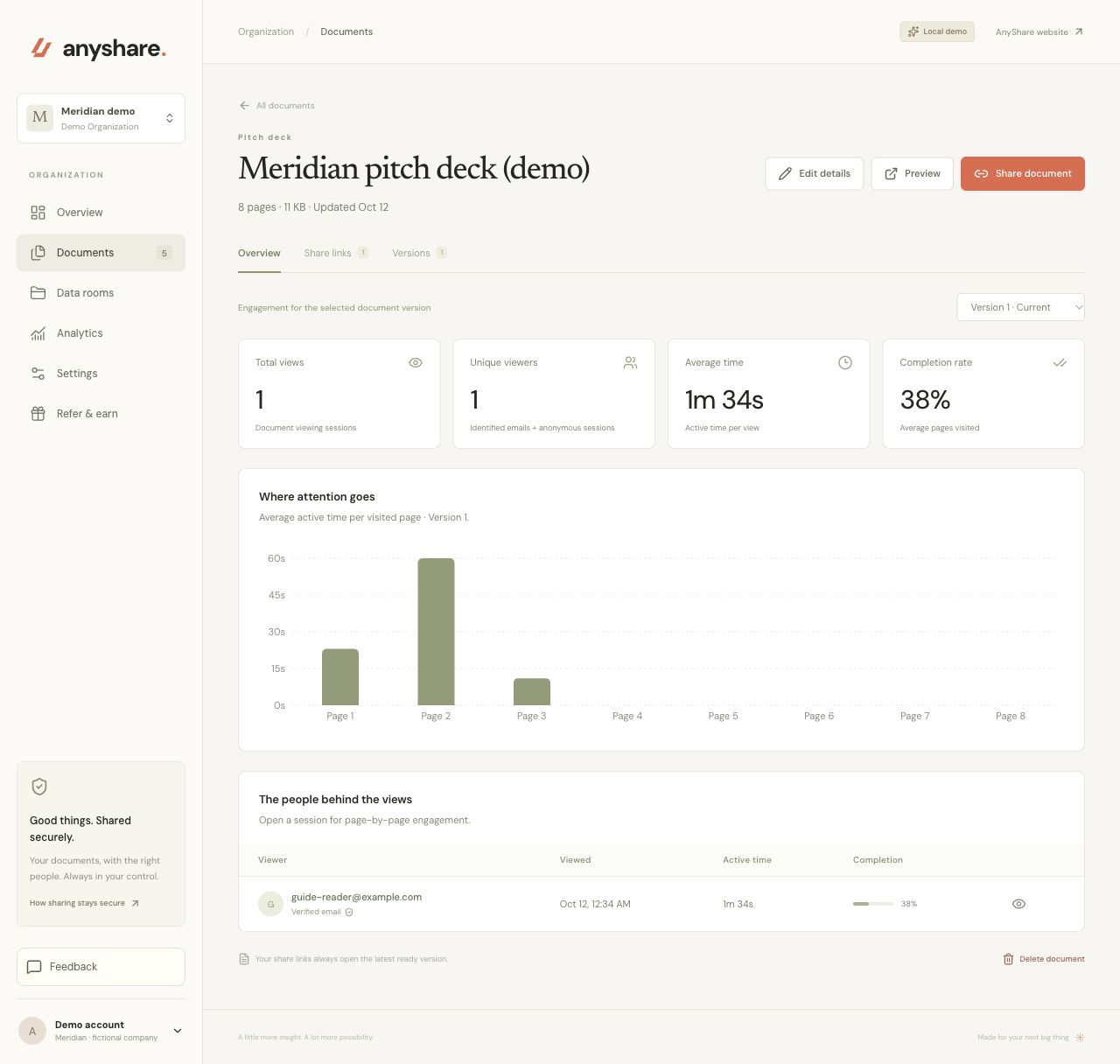
Where the time was recorded.
The chart on the Overview is average active time per visited page for the selected version. Pages with no recorded time stay at zero. Select the eye icon on a row to open that session. The detail shows active time, completion, pages visited out of the version’s page count, and a bar for each page.
Session detail can also show the device and an approximate city and country. The privacy notice says that location comes from the hosting provider, and that AnyShare does not store the raw IP address or precise coordinates in the viewing record. Read Privacy before you rely on a location.
For more than one document, open Analytics. Filter by document, version, and date range, then export a CSV. The export follows those filters. It is the same activity, not a second measurement.
Activity, not a verdict.
The timer pauses.
Time accumulates on the current ready page while it is visible and the window has focus. It pauses when the tab is hidden, the window loses focus, or no pointer, keyboard, scroll, or touch activity is detected for 60 seconds.
Completion is pages with time.
Three pages with recorded time in an eight-page file are 38% after rounding, which is the demo in the screenshot. That percentage does not measure comprehension.
A room opening is not every file.
A data-room link admits someone to that room. Open each document’s Overview to see whether that file was viewed. Folders do not record a separate permission.
If time sits on one page, prepare to talk about that page. If a session ends immediately, check whether the file opened before you treat it as a lack of interest. Pair the record with what the person actually says.
A few practical answers.
01Why don’t I see a viewer yet?
Creating or copying a link does not create a visit. The recipient has to open that share link and pass the access checks. Refresh the document’s Overview and check the version selector. A preview you open to check the file is for you. Use a recipient visit when you want to confirm the recorded flow.
02What does an anonymous viewer mean?
If the link allows anonymous viewing, the session is labeled Anonymous viewer. AnyShare cannot attach a name. Unique viewers group sessions that share an email address. Each anonymous session counts separately.
03Does active time prove they read the document?
No. Time counts on the visible, focused page. It pauses when the tab is hidden, the window loses focus, or no pointer, keyboard, scroll, or touch activity is detected for 60 seconds. Completion is the percentage of that version’s pages with recorded active time. These figures are activity, not proof of attention or agreement.
04Can I export who viewed the document?
Yes. Analytics can export a CSV for the selected date range, document, and version. Reading analytics, including through an assistant connection, does not create a document view.